
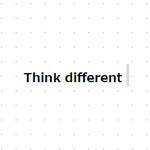

サービスのコンセプトや企業の理念など、テキストに動きをつけることでメッセージ性を高く表現することができます。そのなかでも、タイプライター風に文字(テキスト)を一文字ずつ入力しているような表現を、JavaScriptのプラグインを利用して実装する方法をご紹介いたします。
ちょっとした動きで見る人にワクワクするような感覚を与えることができるので、視覚的に伝えたいメッセージを表示する際に使えそうですね。
まずは、デモサンプルをご確認ください。
このようなタイプライター風の動きを表現できるプラグインで、サンプルでは英語「Think different.」と日本語「固定概念をなくして発想を変えよう。」の2文を表示しています。
是非試してみてください。
JavaScriptのプラグイン「iTyped.js」を使用する方法になりますので早速見ていきましょう。
iTyped.jsをダウンロード
以下より「iTyped.js」をダウンロードします。
「GET STARTED NOW!」ボタンでGitHubへ移動してください。
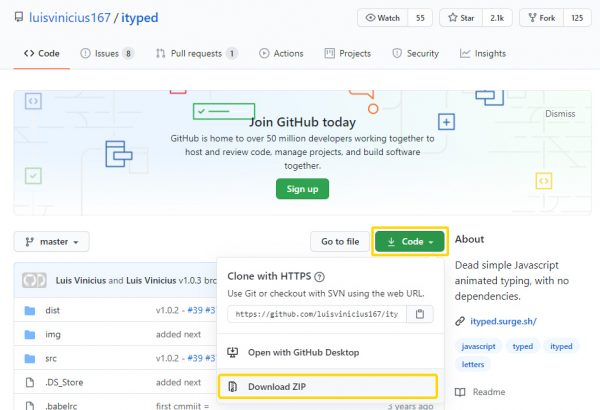
ダウンロードファイルを解凍し、「dist」の中の「index.js」または「index.min.js」を使用します。
CDNを利用する場合
以下のタグを読み込むことで利用できます。
ityped@1.0.3
<script src="https://unpkg.com/ityped@1.0.3"></script>
HTMLを用意
サンプルとして以下のようなhtmlで実装していきます。
記述内容は適宜変更してみてください。
<div class="box">
 <p><span id="ityped"></span></p>
</div>
CSSを記述
公式でサンプルとして利用されているままのcssで実装してみます。
.ityped-cursor {
    font-size: 1em;
    opacity: 1;
    -webkit-animation: blink 0.3s infinite;
    -moz-animation: blink 0.3s infinite;
    animation: blink 0.3s infinite;
    animation-direction: alternate;
}

@keyframes blink {
    100% {
        opacity: 0;
    }
}

@-webkit-keyframes blink {
    100% {
        opacity: 0;
    }
}

@-moz-keyframes blink {
    100% {
        opacity: 0;
    }
}
JSを記述
htmlの</body>タグ直前にスクリプトを記述していきます。「strings: [”]」の中に表示するテキスト本文を記述しますが、今回は2文を表示するように「,」で2つ記述してあります。
<script src="js/index.js"></script>
<script>
ityped.init(document.querySelector("#ityped"), {
    strings: ['Think different.', '固定概念をなくして発想を変えよう。']
})
</script>
カスタム
init("#ityped", {

    /**
     * @param {Array} strings An array with the strings that will be animated
     * アニメーションで表示すテキストを配列形式で指定
     */
     strings: ['Put your strings here...', 'and Enjoy!']

    /**
     * @param {Number} typeSpeed Type speed in milliseconds
     * ミリ秒単位でアニメーションのタイピング速度を指定
     */
     typeSpeed:  100,

    /**
     * @param {Number} backSpeed Type back speed in milliseconds
     * ミリ秒単位でアニメーションが戻る際の速度を指定
     */
     backSpeed:  50,

    /**
     * @param {Number} startDelay Time before typing starts
     * ミリ秒単位でアニメーションが始まるまでの時間を指定
     */
     startDelay: 500,

    /**
     * @param {Number} backDelay Time before backspacing
     * ミリ秒単位でアニメーションが戻る時間を指定
     */
     backDelay:  500,

    /**
     * @param {Bollean} loop The animation loop
     * アニメーションを繰り返しループさせるかを指定
     */
     loop:       false,

    /**
     * @param {Bollean} showCursor Show the cursor element
     * カーソルを表示するかを指定
     */
     showCursor: true,

    /**
     * @param {Bollean} placeholder Write the string in the placeholder content
     * プレースホルダーのコンテンツにテキストを書き込むかを指定
     */
     placeholder: false,

    /**
     * @param {Bollean} disableBackTyping Disable back typing for the last string sentence
     * アニメーションが戻る際の処理を入れるかを指定
     */
     disableBackTyping: false,

    /**
     * @property {String} cursorChar character for cursor
     * カーソルとして表示する記号や文字を指定
     */
     cursorChar: "|",

    onFinished: function(){},
}
以上で完成です。プレビューしてみてください。
まとめ
カスタマイズについては豊富ではありませんが、比較的簡単に実現できるのでアクセントに使用してみてもいいですね。
また、jQueryに依存していないため動作も早く不可も少ないので注意点も少ないと感じます。